
Protective Case Sizing Guide
How to Measure for a Protective Case
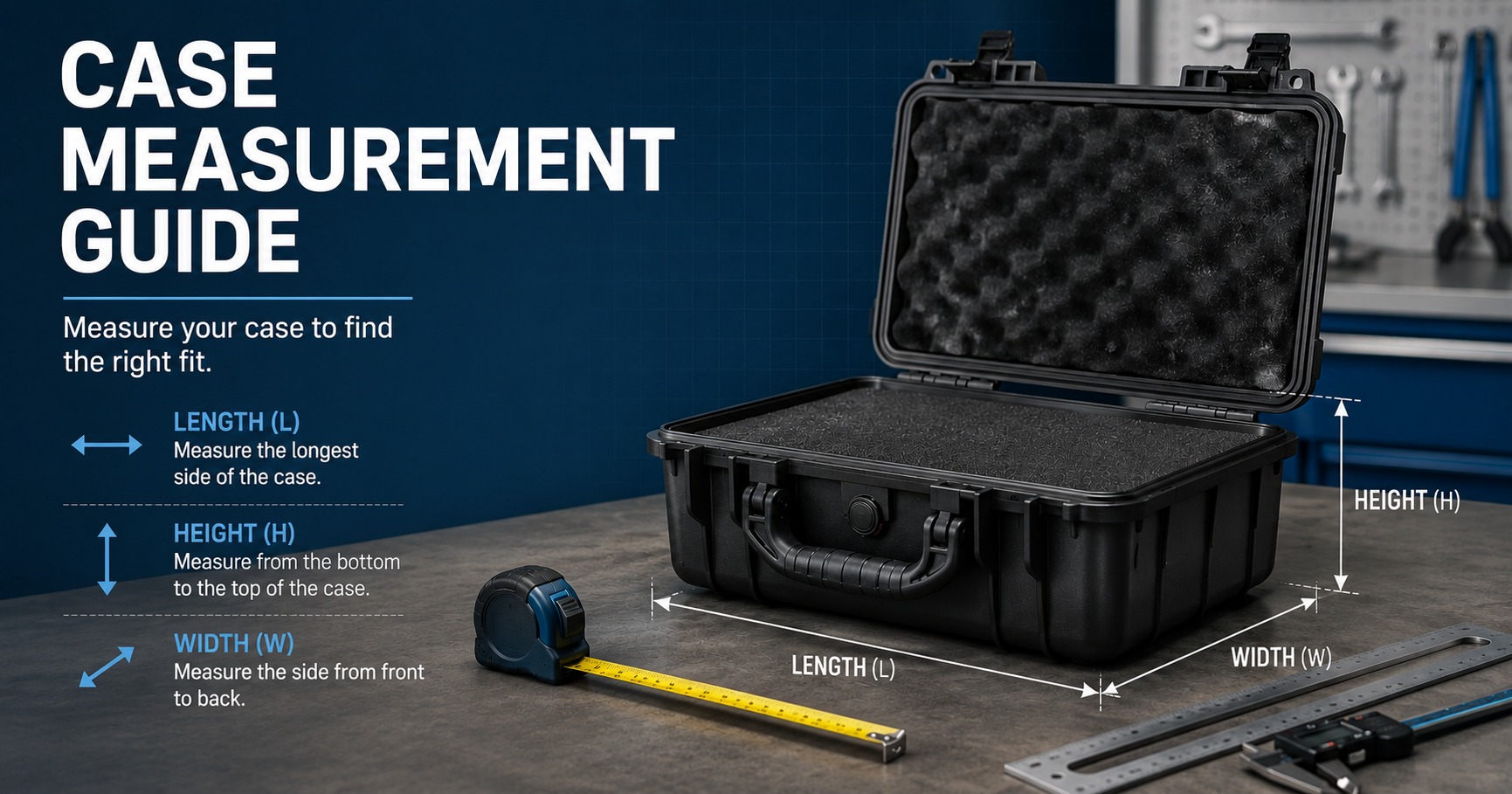
Choosing the right protective case starts with accurate measurements. Use this guide to measure equipment length, width, height, weight, accessories, foam clearance, rack depth, screen size, and usable interior space before selecting a case.
Whether you are protecting laptops, servers, rack equipment, flat screens, tools, electronics, instruments, or shipping equipment, proper sizing helps reduce fit issues and improves protection during storage, handling, shipping, and transport.
- Measure the equipment itself, not only the case or screen size
- Account for foam, dividers, handles, lids, wheels, rack depth, cables, and accessories
- Use exact equipment dimensions when requesting quote or fit support
Jump to: Measurement Steps, Sizing by Equipment, Dimension Definitions, Common Sizing Mistakes, FAQs, Case Fit Support
The best protective case fit starts with the equipment itself. Measure the full outside dimensions of the item, include protruding parts, account for accessories, and leave enough room for foam, dividers, padding, cable clearance, lid depth, and safe handling.
Step-by-Step Guide
How to Measure Your Equipment
Use these steps before shopping, using a case finder, or requesting a quote.
1. Measure Length, Width, and Height
Measure the equipment at its widest, tallest, and deepest points. Include protruding knobs, ports, brackets, handles, feet, hinges, connectors, or attached accessories.
2. Add Clearance for Protection
Leave room for foam, dividers, padding, lid depth, cable clearance, and handling space. A case that is too tight can reduce protection and make loading difficult.
3. Confirm Equipment Weight
Check the total loaded weight, including accessories. Weight affects wheel selection, handle comfort, shipping method, and whether a larger or reinforced case is needed.
4. Include Accessories
Account for chargers, cables, tools, documents, mounts, remotes, microphones, batteries, adapters, spare parts, or anything else that needs to travel with the main equipment.
5. Consider Transport Method
Hand carry, vehicle transport, freight, parcel shipping, air travel, field use, and repeated deployment all affect case style, shell type, wheels, and interior protection.
6. Review Interior vs. Exterior Size
Interior dimensions determine equipment fit. Exterior dimensions affect storage, shipping, vehicle loading, freight cost, carry-on limits, and handling space.
Fit Checklist
Measurements to Have Ready Before Choosing a Case
These details help narrow the correct protective case size, interior layout, and transport style.
- Equipment length, width, and height at the widest points
- Total loaded weight, including accessories and cables
- Accessory list and whether accessories need separate compartments
- Preferred foam, divider, padded, or open interior style
- Transport method, such as hand carry, wheels, vehicle, parcel, freight, or air travel
- Any clearance needs for handles, cables, connectors, rack rails, mounts, or lids
Sizing by Equipment Type
What to Measure for Different Case Types
Different equipment categories require different measurements and fit checks.
Laptop & Tablet Cases
Measure device quantity, screen size, charger storage, device thickness, cart or case layout needs, and whether each unit requires separate protection.
Server Cases
Measure server depth, rack unit height, width, rails, handles, cable clearance, and loaded weight. Confirm whether the server ships mounted or separate.
Rack Cases
Confirm rack units, rack depth, equipment depth, rear cable clearance, lid depth, shock protection needs, and whether the case needs wheels.
Flat Screen Cases
Measure screen size, overall monitor width, height, depth, stand requirements, mount hardware, and whether multiple displays need to travel together.
Shipping Cases
Measure the equipment footprint, height, accessories, and needed foam thickness. Consider wheels, handles, stacking, repeated use, and shipping method.
Custom Foam Interiors
Measure each item separately and note required spacing between items. Custom foam may need extra clearance around equipment for impact protection.
Dimension Definitions
Interior Dimensions, Exterior Dimensions, and Usable Space
Understanding the difference between case dimensions and equipment dimensions helps prevent fit problems.
| Measurement | What It Means | Why It Matters |
|---|---|---|
| Interior Dimensions | The inside length, width, and height of the case. | Determines whether the equipment and protective interior can fit. |
| Exterior Dimensions | The outside size of the case, including shell, lid, handles, wheels, and hardware. | Affects storage, shipping, freight cost, vehicle loading, and carry-on limits. |
| Usable Space | The practical space left after foam, dividers, lid depth, rails, or padding are considered. | Helps avoid choosing a case that technically fits but is too tight to protect the equipment. |
| Loaded Weight | The combined weight of the case, equipment, accessories, and interior protection. | Impacts wheel needs, handle comfort, freight method, and safe handling. |
Avoid Fit Problems
Common Case Sizing Mistakes
These are the most common issues that cause a protective case to fit poorly or leave too little room for protection.
Using Screen Size Instead of Overall Size
For monitors and laptops, the diagonal screen size is not the same as the full outside dimensions. Measure the full width, height, and depth.
Forgetting Cables and Accessories
Chargers, cables, brackets, tools, remotes, and adapters often need their own space. Include them before choosing the interior size.
Ignoring Foam Clearance
Foam takes up interior space. Leave enough room for protective material around the equipment instead of matching the case exactly to the equipment size.
Only Checking Interior Dimensions
Interior dimensions confirm fit, but exterior dimensions affect storage, vehicle loading, freight, parcel shipping, and handling.
Fit Support
Case Sizing Help from Specialty Cases
Specialty Cases helps customers compare protective cases by equipment size, interior space, transport method, foam requirements, brand options, and application needs.
Case Sizing FAQs
Frequently Asked Questions About Measuring for a Case
These answers cover common protective case sizing questions before choosing a stock case, case finder result, or custom foam interior.
Should I measure the equipment or the old case?
Measure the equipment itself whenever possible. Old cases may have extra space, compressed foam, or interior layouts that do not match the equipment’s current fit requirements.
How much extra space should I leave for foam?
The amount of clearance depends on equipment weight, fragility, transport method, and foam type. A tight case can reduce protection, so include room for padding around the equipment.
Is screen size enough for laptop or flat screen cases?
No. Screen size is usually diagonal and does not include the full outside width, height, depth, stand, bezel, hinge, or attached accessories. Measure the overall outside dimensions.
What should I send for a rack case recommendation?
Send rack units, equipment depth, rear cable clearance needs, total loaded weight, transport method, and whether you need shock protection, wheels, removable lids, or console-style access.
Need Help Confirming Fit?
Send Us Your Equipment Measurements
Share your equipment dimensions, quantity, weight, transport method, and protection needs so our team can help recommend a suitable protective case.